
Call Recording Transcription
On Android devices, calls recorded using a supported call recording app can be automatically transcribed after the call ends.
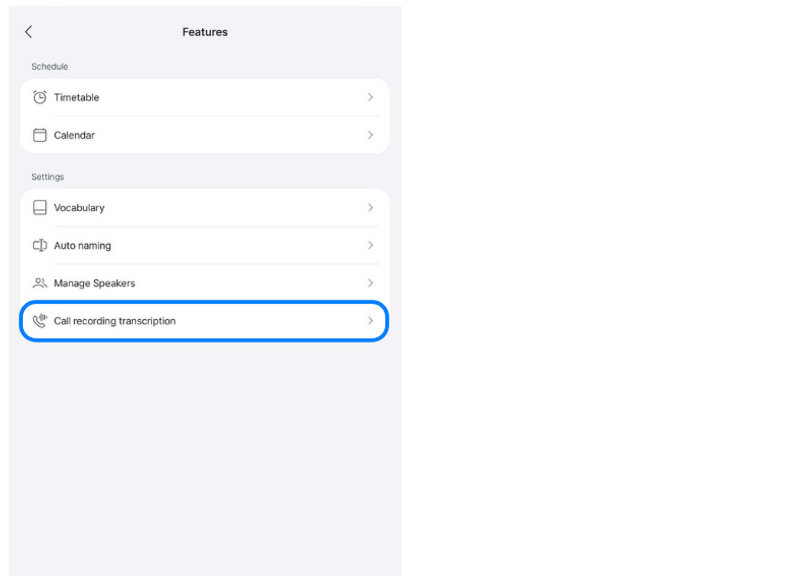
In the app, go to More in the bottom-right corner > App Settings > Features > Call Recording Transcription.
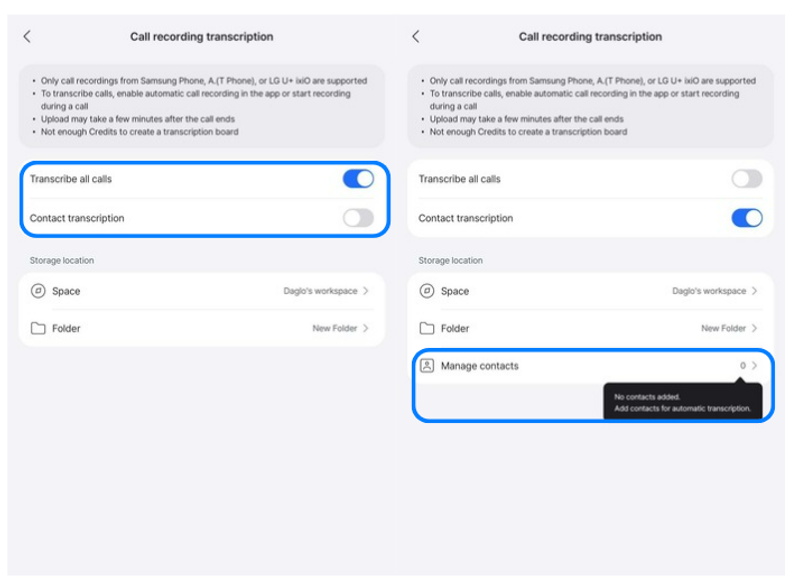
Under Call Recording Transcription, you can choose between Transcribe All Calls and Transcribe Calls from Selected Contacts.
If you select Transcribe All Calls, all recorded calls will be transcribed.
If you select Contact transcription, recorded calls with contacts registered under Storage Location > Manage Contacts will be transcribed after the call ends.
※ Notes
- Only call recordings made using Samsung Phone, A. (T Phone), or LG U+ ixiO are supported.
- Transcription begins after the call ends and the recording file has been uploaded.
- If you do not have enough credits, a transcription board may not be created.
- If you choose Contact transcription, the contact name and phone number saved in your phone’s contacts must match the number registered under Manage Contacts in Daglo.
- If you rename a call recording file before uploading and transcription are complete, the file may not be recognized and transcription may fail.