
Invite and Manage Members
Once you have created a Team Space, it is time to invite the team members you will collaborate with.
Invite Team Members
On the Members page, click [+ Invite Members] in the upper-right corner to add a new member to the Team Space.

- Enter the email address of the person you want to invite, then click [Invite Member].
Note: After entering an invitee’s email address, press a comma (,) or click the button displayed below the field so that the address is added as shown in the example.
Before sending, make sure the final invitee has been correctly added—whether you are inviting one person or multiple people.
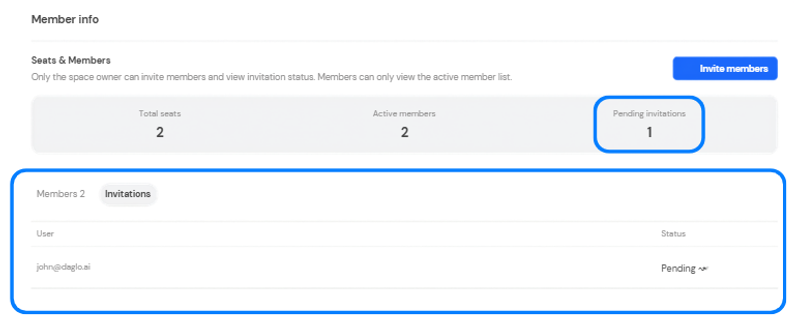
Once an invitation is successfully sent, the number shown under [Pending Invitations] at the top changes.
Click [Invitations] at the bottom to view invitation details.
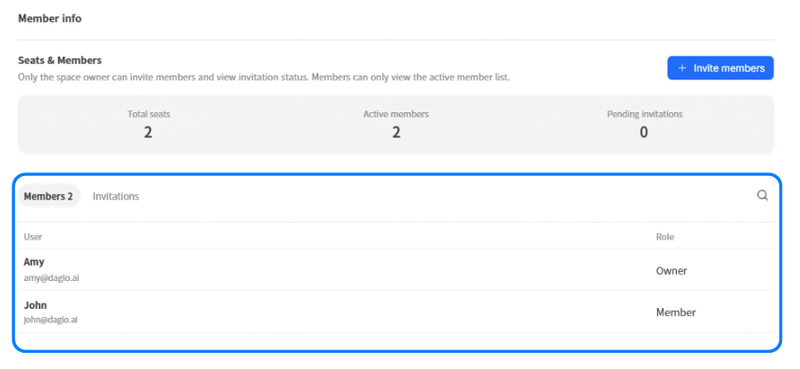
- When an invited member accepts the invitation sent by email, the member appears in the member list.
- If the member list is long, click the magnifying-glass button in the upper-right corner of the list to search by name or email address.
Manage Member Authorities
A Team Space has two roles:
- Owner
- Has full permissions for the Team Space.
- Manages Team plan payments and subscriptions.
- Member
- Has standard permissions to create, view, and edit documents in the Team Space.
- Can freely create boards and use transcription and AI features.
- Cannot access member management or invitation settings.
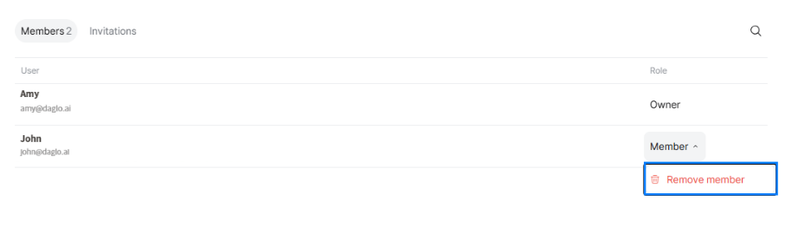
Owners can remove members who no longer work with the team from the Space through the [Members] tab.