
Using AI Features After Transcription
Once text conversion is complete, you can use powerful AI features directly within the board (document).
Completed transcription boards are available under [My Tasks] > [All Boards] on the dashboard.
Board Chat
- Ask questions and receive answers from AI in a chat-like format based on the completed transcript.
- Examples: “What were the main agenda items decided in this meeting?” / “Summarize the idea proposed by the team leader.”
Basic Summary
- Summarize the key points of the entire transcript concisely with a single click.
This is useful when you want to quickly understand a long meeting or lecture.
Template Summary
- Automatically organizes and fills in transcript content according to a predefined format (template), such as General Meeting or Lecture Notes.
- Example: When you select the General Meeting template, AI extracts discussion topics, decisions, and action items from the transcript and turns them into a neatly formatted document.
- If you’re unsure which template to use, try Smart Summary.
Using Custom Templates (Premium/Team Plans Only)
If you cannot find a preferred format in the template summary list, create a custom template to generate a summary in your desired format.
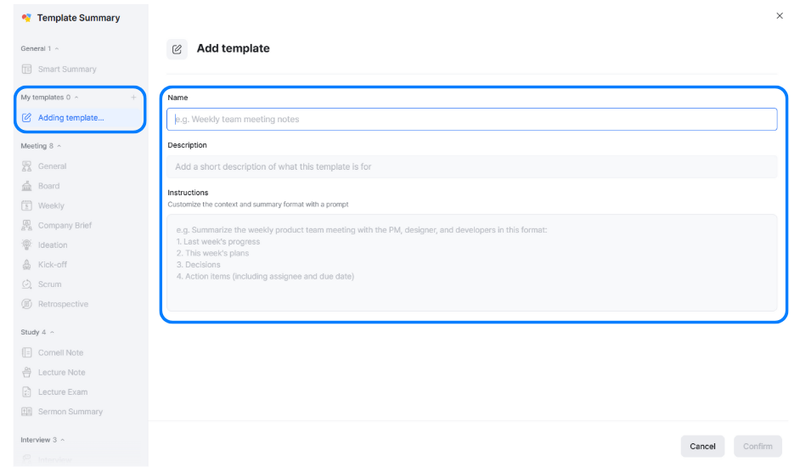
On the template summary screen, click the [+] icon to the right of [My templates] to create and add a custom template.
Enter a name and description for the template, then describe the format and structure you would like the summary to follow.
Once you have completed all fields, click [Confirm] in the bottom-right corner to create your custom template.
※ In the app, you can proceed by tapping [Add template] to the right of [My Templates] under [Template Summary].